Orphan pages and click depth: how to audit your internal linking
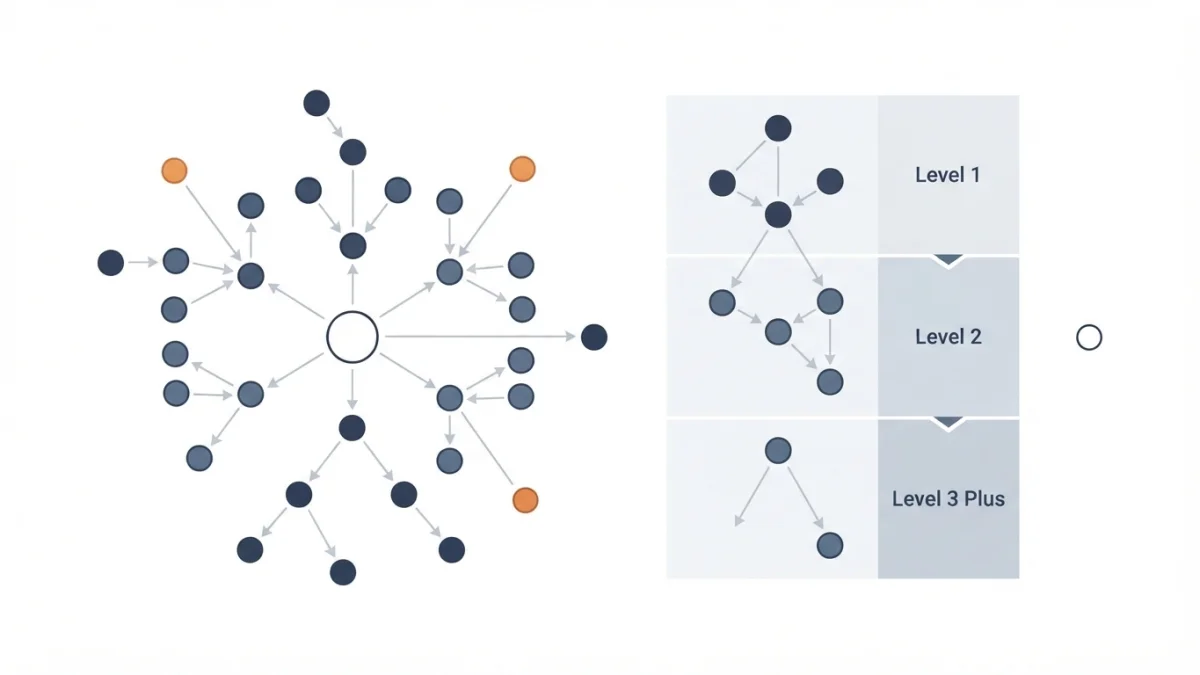
Table of contents
You have 300 articles and a dozen that get no link from anywhere on your own site. Google may know those URLs from your sitemap, but it has no idea where they fit: those are orphan pages. You find them by crawling your own site, not by staring at rankings.
This is the full method: what makes a page orphaned, how to measure click depth, how to cross your crawl against the sitemap and in what order to fix things. No promises about rankings.
What orphan pages are (and why the Links report never shows them)
An orphan page is a published URL that receives no crawlable internal link: it is on your site, but no link from your own pages backs it. The term is not Google's; what Google documents is the rule behind it: "Every page you care about should have a link from at least one other page on your site." (source: Link best practices for Google).
That is why it can still know about it: "In order for Google to learn about a page, you must either submit a sitemap or page crawl request, or else Google must find a link to your page somewhere." Sitemap or link: if your XML sitemap or a backlink found it, it can be indexed and even rank, but it competes with no internal context. If the concept is fuzzy, start with what internal linking is.
Links that do not count as links
Google only crawls real links: "Generally, Google can only crawl your link if it's an <a> HTML element (also known as anchor element) with an <href> attribute. Most links in other formats won't be parsed and extracted by Google's crawlers." Menus built with onclick, javascript: links, buttons and clickable layers discover nothing. JavaScript-injected links do count: "It's fine to use JavaScript to inject links into the DOM, as long as such links follow the best practices for crawlable links." Check the rendered HTML, not the source.
Orphan is not the same as "not indexed"
Do not confuse four states that have nothing to do with linking: noindex, manual deindexing, 404 and soft 404, and canonical issues. An orphan page can be indexed and still get impressions; the problem is that your site does not say where it fits.
Click depth: what it measures and what Google actually says
Click depth is the number of clicks needed to reach a URL from the home page (level 0). It is an architecture metric: you measure it with your own crawl, not in Search Console.
Google documents the goal, not a number: "We strongly recommend ensuring that your homepage is indexed. Starting from your homepage, Google should be able to index all the other pages on your site, if your site has comprehensive and properly implemented site navigation for visitors."
And it justifies the audit: "Clean up the traffic flow within your site by confirming that users can get from page A to page B with the fewest clicks."
Google publishes no click threshold: the "three-click rule" is an industry criterion, useful for prioritising, not a search engine rule.
Navigation versus contextual links
Navigation links (menu, footer, breadcrumbs) reach everything and add little context; contextual links written inside an article add what Google documents as a signal: "Google uses links as a signal when determining the relevancy of pages and to find new pages to crawl." Every important URL should have at least one contextual link.
PageRank still counts (but it is not everything)
Link analysis remains in its core systems: "Among these is PageRank... it continues to be part of our core ranking systems." (guide to ranking systems). But "PageRank is just one of those" signals: linking well helps, it is not a ranking button.
Step one: what Search Console already shows you
The Links report will not hand you the orphan list, but it confirms hypotheses: it shows the most linked pages on your site and which pages point to a URL (Links > Internal links > Top linked pages > MORE), with exports of up to 100,000 rows.
Its limit: it is a sample, and there is no "pages with zero internal links" filter. That is why the list comes from a crawl, and Search Console helps confirm that core pages are linked: "Confirm that the core site pages (home page, contact page) are properly linked within your site." (help page for the Links report).
Two more uses: the "Unsubmitted pages only" filter (URLs Google knows without a sitemap, typical orphan candidates found through backlinks) and the reason "Discovered - currently not indexed": "the page was found by Google, but not crawled yet". For Google's real trail, server log analysis.
Step two: crawl your site and cross it with the sitemap
Tools: Screaming Frog SEO Spider, whose ceiling its own site declares: "Screaming Frog SEO Spider is free, however you can purchase a licence to crawl more than 500 URLs and have access to advanced features". Sitebulb, the crawlers inside paid suites or your own will do too. On large sites the free tier falls short.
The method: crawl from the home page following internal links only, against production and never against a staging site with noindex; turn rendering on if your site uses JavaScript; export inlinks, depth and anchors per URL; and cross it with the sitemap: whatever sits in the sitemap and is not the destination of any internal link is a candidate.
A minimal cross-check from the terminal:
curl -s https://example.com/sitemap.xml | grep -o '<loc>[^<]*' | cut -c6- | sort -u > sitemap.txt
grep -rhoE 'href="[^"]+"' ./html/*.html | sed -E 's/href="//; s/"$//' \
  | grep -E '^(/|https://example\.com)' \
  | sed -E 's|^/|https://example.com/|; s/#.*$//; s/\?.*$//' | sort -u > linked.txt
comm -23 sitemap.txt linked.txt
Warnings: menu and footer links appear on every page and water down the diagnosis; normalise URLs with parameters before comparing; and a sitemap holds 50 MB or 50,000 URLs per file. Crawling too much or too little is already crawl budget.
How to prioritise and fix (not every orphan matters)
Prioritise with three criteria: business value (product, service, key landing page); pages with external backlinks your site does not back; and pages with impressions in Search Console. Then add old articles that just need a content refresh and pages left out of a topical authority cluster.
Work in this order: a contextual link from the sibling article, which is the fastest and adds the most context; a link from the cluster hub so level 1 does not depend on the menu; menu or breadcrumbs only for core pages; and the sitemap as a discovery patch, never a solution.
Avoid: linking everything from the footer, nofollow on internal links, the same exact keyword in every anchor and automatic links with no topical relationship.
Five internal linking myths that refuse to die
- More than 100 links per page gets you penalised. False: "There's no magical ideal number of links a given page should contain. However, if you think it's too much, then it probably is."
- Nofollowing internal links spreads authority better. The guide points elsewhere: "For links within your own site, use the robots.txt disallow rule."
- The sitemap replaces internal linking. The sitemap reports URLs; links add relevance: "Google uses links as a signal when determining the relevancy of pages and to find new pages to crawl."
- Menu and footer links do not count. They count: no documentation ignores them. The real issue is volume and lack of context.
- You must put the exact keyword in every internal anchor. The anchor should be descriptive: "resist the urge to cram every keyword... keyword stuffing is a violation of our spam policies". The full typology lives in anchor text.
Checklist: auditing internal linking in 10 steps
- Confirm the home page is indexed and the menu uses real
<a href>links. - Export the sitemap URLs.
- Crawl the site from the home page, with rendering on if your site needs it.
- Get per URL: internal inlinks, click depth and anchors.
- Cross the crawl against the sitemap and flag zero-inlink pages.
- Sort by business value, external backlinks and impressions.
- Write the contextual link in the sibling article: two per page at most, and only where it makes sense.
- Move whatever is a category up to the cluster hub.
- Check in Search Console that core pages are linked, then crawl again after 30 days.
- Log which URL got linked, from where and with what anchor, so you do not repeat it.
An orphan page is not punished by Google: it is loose. It can be indexed and even rank, but no context on your site says where it fits. Linking it well does not raise rankings on its own; it stops wasting discovery, context and visits.