H1, H2, and H3 Headings in SEO: How to Structure Them and Which Myths to Ignore
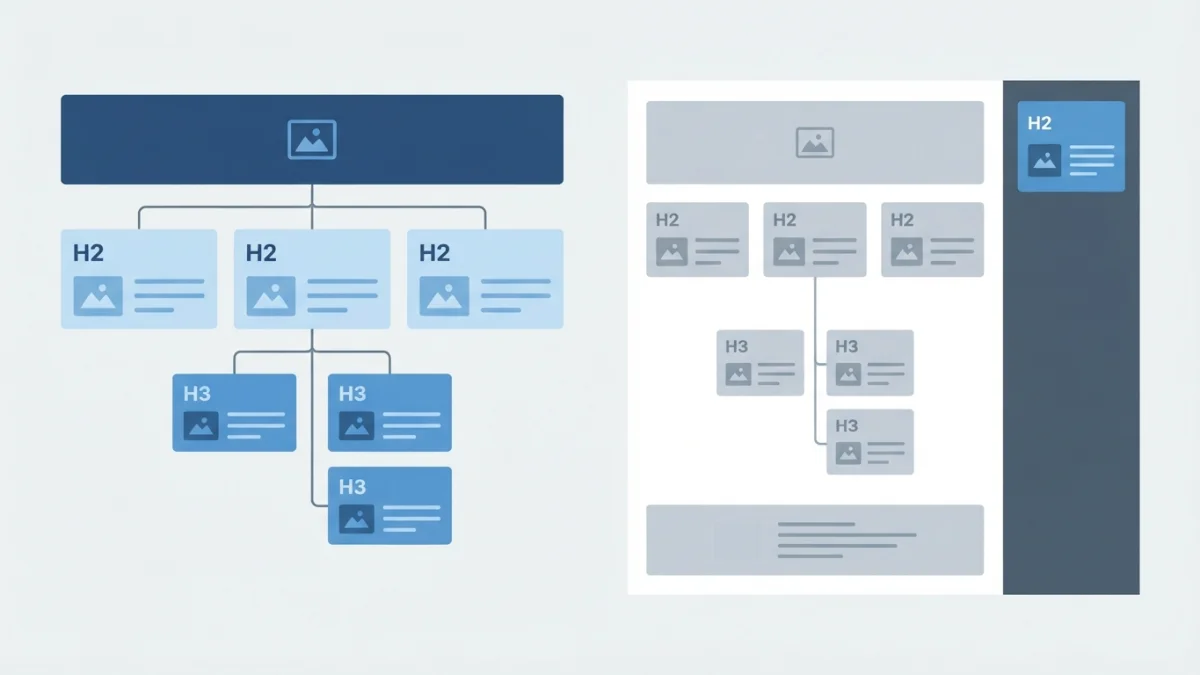
Table of contents
HTML headings (H1, H2, H3) organize your content and tell search engines what each section is about. Around them circulate rules Google never published: that only one H1 is allowed, or that skipping a level breaks SEO. Here is what the official sources actually say.
What HTML Headings (H1-H6) Are and What They Do
Headings are HTML tags that mark the titles and subtitles of a page: <h1> for the main title, <h2> for sections, <h3> for subsections, and so on up to <h6>. They are not decoration or a way to make text bigger: they describe the structure of the document.
One distinction that prevents confusion: <title> and headings are not the same thing. The <title> is the browser tab text and the main source of the title link in search results; headings organize what is inside the page. If your question is about the former, read SEO titles that earn clicks.
The Six Levels and What "Hierarchy" Means
The useful analogy is a word processor: one big title, section titles below it, and subsections inside each one. Hierarchy is that dependency relationship, not the font size: an <h3> only makes sense if it belongs to the section opened by the <h2>. The classic mistake is picking a level by appearance: if the H2 looks too big and you "fix" the design by dropping to H4, you changed the structure to solve a CSS problem.
For Google: Topic Signals, Not a Keyword Field
Headings help search engines understand what each block is about. John Mueller described a heading as "a really strong signal telling us this part of the page is about this topic," and made clear the level barely matters: "whether you put that into an H1 tag or an H2 tag or H5 or whatever, that doesn't matter so much" (Search Engine Journal). It is a prominent location for the words people use, as Search Essentials asks, never a field where you force them.
For People: The Page Map
Readers do not read everything: they scan. Descriptive headings let them decide whether a section is worth their time. And since most sites build a table of contents from H2 and H3 tags -this article's own index works that way-, a vague heading breaks navigation and the index at once.
What Google Says About Headings (and What It Doesn't)
Heading Order and Count: What the Official Guide Says
The Google SEO Starter Guide settles two myths: keeping headings in semantic order "is fantastic for screen readers, but from Google Search perspective, it doesn't matter if you're using them out of order," and "there's also no magical, ideal amount of headings a given page should have." Skipping a level does not penalize you, but it is still a bad idea for accessibility.
Your Headings Can Become the Title Link in Results
Here is the real reason to care. In Influencing Title Links in Google Search, Google explains it uses "heading elements, such as <h1>" among the sources for the title link, and documents a common problem: when a page has more than one large, prominent heading and it is unclear which is the main title, it may use the first one it finds. That is why it recommends distinguishing it from the rest, for example in the first visible <h1>: not to rank better, but to keep control of the text people see in results.
Clarity and Honesty: People-First Content
The Creating Helpful, Reliable, People-First Content guide includes two self-assessment questions that apply directly: does the main heading provide a descriptive, helpful summary of the content? Does it avoid exaggerating or being shocking?
The Five Most Repeated H1 Myths
Myth 1: "Only One H1 per Page Is Allowed"
HTML never banned multiple H1 tags and Google does not penalize them. The problem is having two equally large titles competing to be the main one.
Myth 2: "The H1 Must Contain the Exact Keyword"
It is a prominent location, not a keyword field: if forcing it makes you write something nobody would say out loud, drop it.
Myth 3: "Jumping From H2 to H4 Breaks SEO"
Google says heading order does not matter; it does confuse people navigating with a screen reader. Fix it for accessibility, not for a penalty that does not exist.
Myth 4: "Headings Are a Direct Ranking Factor"
Google talks about signals that help understand content, never about a ranking factor on its own, and there is no confirmation that fixing them moves rankings.
Myth 5: "More Headings = Better SEO" (and the Reverse)
There is no ideal number and "fewer is better" is just as false: the useful rule is one H2 per developed idea and H3 only when that idea needs subdividing.
How to Structure Headings in an Article, Step by Step
One H2 per Idea, H3 Only to Subdivide It
Sketch the outline before writing: the list of ideas you will cover is almost literally the list of H2s. If an H3 holds content that does not belong to its H2, it is not a level problem: it is a new section in disguise.
Descriptive, Specific Headings Without Filler
Cover the content and read only the headings: if you understand what the article is about and how it progresses, they work. Avoid promising more than the section delivers and repeating the same text twice.
The Template H1: Brand, Logo, and Two Big Titles
Many CMS themes put the site name in an H1 on every page and the article title in a second one: two large titles and Google deciding which to use. The fix is leaving the brand in a link or a styled <p>.
Example Skeleton of an Article and What to Avoid
<h1>SEO Headings Guide</h1>
  <h2>What headings are</h2>
    <h3>The six levels</h3>
  <h2>How to structure them</h2>
    <h3>One H2 per idea</h3>
  <h2>Final checklist</h2>
What to avoid in that same skeleton: an H4 right after an H2 with no H3 in between, empty headings or headings wrapping an image, and headings repeated in the sidebar. The structure stops working as a map.
Common Mistakes and How to Audit Your Headings
Picking the Tag for Looks
The most common mistake is choosing the level by appearance. Google and web.dev say the opposite: don't use headings to make text bold or large, use CSS for that.
The Logo as H1 on Every Page; Articles With No H1 at All
The reverse case also exists: templates that render no H1 and leave the article title in a large <div>. You do not lose rankings, but you give Google fewer clues about the page's main title.
How to Audit Them: Inspector, Extensions, and Crawlers
No paid tooling needed: inspect the code and check the tag behind each title. Heading-structure viewers in accessibility extensions show the full tree, and SEO crawlers list headings per URL so you can filter pages with a duplicate or missing H1. The basics are in common SEO mistakes for beginners.
The Part That Does Have Rules: Accessibility
Don't Skip Levels Going Down
The W3C headings tutorial asks you to nest by rank: from H1 downward, never jumping from an H2 straight to an H4, because skipping ranks "can be confusing." Closing a subsection may skip upward. Criteria 1.3.1, 2.4.1, and 2.4.6 of WCAG apply; the full detail is in how to improve accessibility on your website.
Headings That Label Page Regions
A sidebar or footer can carry its own heading, and in fixed regions the W3C asks that the level stay consistent across pages: there they act as navigation labels, not as part of the article hierarchy.
Final Checklist: Headings Done Right in 8 Points
- One clear visible main title per page, in the first
<h1>. - The brand or logo outside the H1.
- One H2 per developed idea, not per design block.
- H3 only inside the H2 it belongs to.
- Descriptive headings, with no "Introduction" or "More information".
- No headings used to enlarge text.
- No levels skipped going down (H2 to H4, no).
- Headings-only read: if the article makes sense without the body, it is fine.
None of these points promises better rankings, and that is on purpose: taking care of your HTML headings helps readers find what they need, helps search engines understand each section, and helps the title shown in results be the one you wrote. The next level connects with semantic SEO and with optimizing your images.