AI traffic in GA4: how to measure visits from ChatGPT, Gemini and Copilot
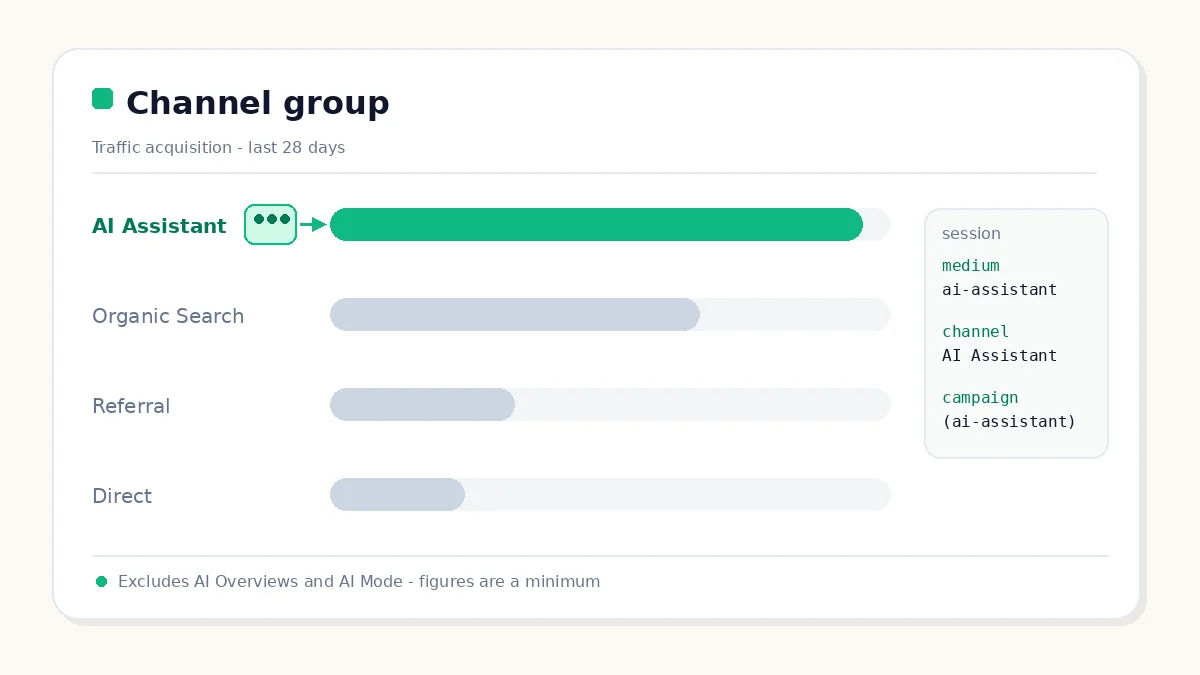
Table of contents
Since May 2026, Google Analytics has its own channel for visits arriving from ChatGPT, Gemini or Copilot. The awkward part: not all AI traffic in GA4 lands there, and some of it still hides in Referral and Direct.
What that channel actually measures, how to see it in five minutes, and what the number on screen lets you claim without overreaching.
What counts as AI traffic in GA4 today (and what doesn't)
The usual mistake is treating "AI traffic" as one thing. There are three separate doors, and only one is traffic in the sense Analytics understands:
- A click from an assistant (ChatGPT, Gemini, Copilot, Grok). There is a session and a landing page, so it can be measured. This is what GA4 groups.
- A click from AI Overviews or AI Mode. It is still a click on a result, but it arrives with a Google referrer and counts as Organic Search. It cannot be split out: the referrer looks exactly like the one from a blue link.
- A mention with no click. The answer cites the site and the user never arrives. No session, so Analytics never sees it.
Rule of thumb: when someone says "AI traffic in GA4", they mean door one. The other two are measured elsewhere, with a different unit, and mixing them inflates almost every number in circulation.
A mention without a click never reaches Analytics
That is not a tool failure, it is the definition of a session. What you can watch is the indirect effect: if impressions rise in the Search Console generative AI report at the same time as branded queries, there is a reasonable hypothesis that you are being cited. A hypothesis, not proof.
The AI Assistant channel: what it actually groups
The official definition is short: AI Assistant is the channel through which users arrive from sources such as ChatGPT, Gemini, DeepSeek, Copilot or Grok. The same help page states, in plain words, that it excludes Google's AI Overviews and AI Mode. That caveat is what separates a serious report from a decorative one.
It was announced in the Analytics "What's new" feed on May 13, 2026 and needs no setup: if the referrer matches a recognised assistant, the session lands there on its own.
The three session values and what each one is good for
- Medium:
ai-assistant, an exact match. This is the value used in filters and explorations. - Default channel group:
AI Assistant. Shows up in acquisition reports and is compared against Organic, Referral or Direct. - Campaign:
(ai-assistant). A tell that it is not one of your campaigns and should stay out of paid reports.
What stays outside the channel
- AI Overviews and AI Mode: excluded by definition and reported as Organic Search. Not a bug, not a pending Google promise.
- Assistants missing from the internal list: Google does not publish that list. When there is no match, the visit falls into Referral with its domain as the source.
- Mobile apps and in-app browsers: with no referrer, the session drops into Direct with no source. That is the real dark traffic.
How to see it in five minutes
Short path: Reports → Acquisition → Traffic acquisition and, in the table, the default channel group. The AI Assistant row is right there with its sessions.
The reading trick is the date: the row starts on May 13, 2026. It does not exist before that, because medium is assigned when the session is collected and GA4 does not rewrite history. Comparing the two periods shows how much of what used to be Referral moved here, not how much AI grew.
An exploration for the landing pages assistants send
In a free-form exploration, use landing page, sessions and conversions, filtered by session medium exactly ai-assistant. It answers the useful question: which content gets cited by AI and still earns a click. The table usually sorts itself: comparisons, how-to guides and definitions.
A custom channel group so you don't depend on Google's list
Under Admin → Data display → Channel groups you can build your own with a condition on session source. A short regular expression covers the most used assistants:
chatgpt\.com|openai\.com|perplexity\.ai|claude\.ai|gemini\.google\.com|copilot\.microsoft\.com|deepseek\.com|grok\.comAn honest caveat: a custom group does not replace the default group across every report. It is a parallel view that fills gaps the native channel misses; it is not "the solution".
Why the number will always be lower than reality
The causes are concrete: missing referrers in apps, links opened from viewers and documents, redirects that strip parameters, cookie blocking and consent, and assistants that simply send no UTMs. The ChatGPT case has three different outcomes worth telling apart:
- A citation link with UTM and referrer: AI Assistant channel (or Referral if the assistant is not on the list).
- A link the user asked for, no UTM but with referrer: Referral with source
chatgpt.com. - A mobile app or viewer with no referrer: Direct with no source. Only this one is dark traffic in the strict sense.
Hence the rule worth writing into the report: treat the figure as a floor, not a ceiling.
The Direct traffic that grows with no explanation
If Direct rises at the same time as AI impressions and branded queries, there is a reasonable hypothesis of dark traffic from assistants. If Direct rises alone, something else is more likely: an app, a campaign, a bookmark. Frame it as a hypothesis, never as a fact.
The four signals that are actually useful
- AI Assistant sessions and conversions: trend and value, not absolute volume.
- Landing pages: which URLs attract assistant clicks, the most actionable output of all.
- Impressions in the generative AI report: visibility without a click, the other side of the funnel.
- Branded queries: the halo effect of a mention that earned no click.
Comparing conversions without fooling yourself
A click from an assistant arrives further down the funnel: the user already asked and already compared. Comparing its conversion rate against an unsegmented blog visit misleads in both directions. Compare against Organic on the same page and the same query type, or skip the comparison.
Anti-hype note: figures such as "AI traffic converts many times better" come from vendors with samples skewed to B2B software. You can describe the phenomenon; repeating the number without a source and a date, you cannot.
Joining GA4 with Search Console without mixing units
The mental table has three rows. Search Console brings AI impressions, with no clicks and no queries. GA4 brings sessions with an identifiable referrer. Mentions without a click are invisible to both. That is why you never subtract one figure from the other or compute an "AI CTR": there is no comparable numerator or denominator.
The general mismatch is covered in Search Console vs Google Analytics 4; here it only applies to assistant traffic.
The minimum dashboard (about one hour of work)
- Four cards: AI Assistant sessions and conversions, AI impressions, branded queries.
- One table: landing page, sessions and conversions for the channel.
- A fixed footnote: "AI Assistant excludes AI Overviews, AI Mode and traffic without a referrer; figures are minimums".
That footnote prevents most misreadings in a meeting and costs one line.
The mistakes that invalidate the report
- Adding AI Assistant and Organic Search together and calling it "AI traffic".
- Comparing months before and after May 2026 without noting the classification change.
- Reading a zero as "AI does not cite me".
- Counting
(ai-assistant)as one of your campaigns in marketing reports. - Presenting the channel as if it measured AI Overviews.
Keeping the historical series usable
Note the change date in the property or channel group description, and leave one line in the quarterly report. Five minutes that save an argument when someone compares April with June and sees a Referral drop that was really a reclassification. It is the same reflex as a search traffic drop: rule out the measurement change first, then look for the real problem.
What to do this week
Three reversible steps: look at the AI Assistant row and compare before and after May; open the landing page exploration and write down the three URLs with the most sessions; check Referral by domain to see which assistants never enter the channel. That gives you a basis for deciding which content to strengthen, which is the job of getting cited by assistants.
An honest close: if the number is small, it does not mean AI does not matter. It means the click stopped being the unit of AI search. Editorial decisions rest on the four signals together, not on one, and they are presented next to metrics that actually close a report.
Sources: What's new in Google Analytics, Default channel group, generative AI performance report and assistant traffic attribution.