Visual search: how to get found when the search starts with a photo
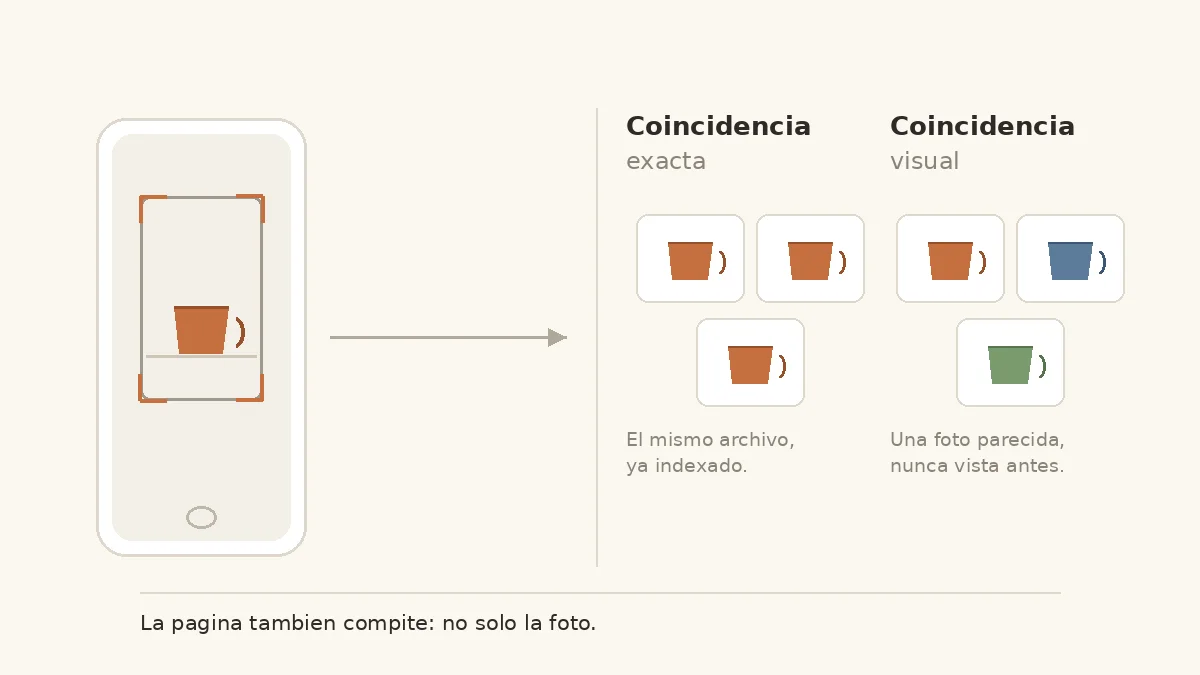
Table of contents
In visual search the query is not a phrase, it is an image. Google returns sites that contain that photo or a similar one, and since September 2026 that traffic has its own filter in Search Console.
This guide sorts the work by the two paths that exist, lists the signals Google documents and ends with a checklist you can go through in ten minutes.
What visual search is and how it differs from Google Images
In one sentence: the query is a photo, a screenshot or a live camera feed, and the answer is pages, objects and similar images. According to Google's own help page, results may include AI summaries, objects that appear in the image, similar images and websites that contain that image or a similar one. That last point is what this article is about.
The usual confusion is mixing it with Google Images. There you type words and get thumbnails; here you show a photo and get pages competing for that object. Different inventory, different levers. The image indexing side lives in how to appear in Google Images; this article covers the reverse direction.
The five places it happens today
- Google Lens, in the app, in the camera and in Chrome.
- Circle to Search on Android: circle something on screen and ask about it.
- Uploading or dragging an image straight into Search.
- "Search this image" from the Chrome right-click menu, which opens Lens on that element.
- Search Live inside AI Mode: voice and camera in a conversation. It expanded to more than 200 countries in March 2026 and appears as a "Live" option inside Lens.
For scale: Google published in October 2024 that Lens handles nearly 20 billion visual searches every month and that 20 percent of them are shopping-related. That is the last figure Google put in writing, so cite it with its date instead of extrapolating it forward.
Two ways to show up: exact match and visual match
Exact match. Google recognizes the same file it already indexed. People find you when they photograph your product, your storefront or an image you published. You win this with presence and a stable archive: the photo exists, it is crawlable, and it always lives at the same URL.
Visual match. Your photo was not in the index for that query, but it looks close enough to what the user is pointing at. Here clarity decides: what object is visible, against what background, from what angle. An ambiguous image competes worse than an obvious one.
The consequence is simple: the first path is won with an archive, the second with photography. Neither is won with a new tag.
The signals Google documents
Google's image SEO documentation says that to figure out what an image is about, they use its alt text along with computer vision algorithms and the content of the pages where it appears. Alt text is one of three hints, not a switch: the image is analyzed on its own and the page text provides context.
What is genuinely under your control:
- The image is crawlable. Google does not index images that exist only as CSS backgrounds: it needs a real
<img src>in the HTML. - There is one canonical URL per image. The same document recommends referencing it with the same URL every time so Google caches it. Ten thumbnails at ten different URLs split the signals.
- The format is supported: BMP, GIF, JPEG, PNG, WebP, SVG and AVIF.
An image that only loads through JavaScript with no src in the initial HTML is the most common failure here; the lazy loading guide covers that case, and weight is handled with WebP or AVIF.
Product photography is where visual matching is won
If you sell something, this is your chapter. Five short rules:
- One object per photo. Collages and lifestyle shots blur the match.
- A clean, consistent background across the category, so the only variation is the product.
- Even light, without hard shadows that distort the object's shape.
- Several angles, because the user points from wherever they can.
- Recognizable scale: crop so hard that size becomes unclear and the comparison degrades.
The problem almost nobody mentions is stock imagery. If hundreds of stores use the same photo of the same pack, the system returns "the same thing" for all of them and none stands out. There your own photo is not aesthetics, it is differentiation.
Text inside the image gets read
OCR is part of visual reading. A label, a size or a model number written in the photo gets interpreted and adds context. It helps when it carries real information and backfires when it is a huge banner covering the object: the system reads "50 percent off" when you wanted it to read "ceramic mug".
Watermarks and variants
A watermark protects and gets in the way in equal measure. If you use one, keep it discreet and always in the same spot, so it does not become the most salient element. With variants (color, size) the rule that saves trouble is same scene, one change per photo: change background, angle and lighting between the blue and the red version and they stop resembling each other, each competing alone.
The license badge: visual search's own rich result
Google Images can show who created an image, how it may be used and the credits. With license data, an image can earn the "Licensable" badge, which links to the license and the usage terms.
It truly matters for stock agencies, photographers, publishers, museums and institutions. For a store with its own catalog photos it adds nothing; do not spend an afternoon there.
There are two routes. Structured data: license and acquireLicensePage, plus creator, creditText and copyrightNotice. And IPTC metadata inside the file. If the two conflict, Google uses the structured data. IPTC is set once per image; structured data has to be repeated on every page where the image appears.
The minimum markup block
You do not need to copy the full example from the documentation:
{
  "@context": "https://schema.org",
  "@type": "ImageObject",
  "contentUrl": "https://ejemplo.com/photos/ceramic-mug.webp",
  "license": "https://ejemplo.com/usage-license",
  "acquireLicensePage": "https://ejemplo.com/how-to-license",
  "creator": {"@type": "Organization", "name": "Ejemplo Studio"}
}
A prerequisite people forget: those pages must be accessible without logging in and must not be blocked by robots.txt or meta robots. The wider frame is in rich snippets and schema markup.
How to tell whether it works: the multimodal filter
Since September 24, 2026, Performance has a multimodal search type that separates image queries from text queries. It covers Lens, Circle to Search on Android, image uploads and "Search this image" in Chrome, and it also shows up in the generative AI report. How to read it is covered in multimodal search in Search Console.
What to compare: Web against Web: multimodal against Images, same period, same country, by page. And a limit worth saying out loud: there is no query dimension and it only counts when there is a click. A zero does not mean "I do not show up", it means "no clicks were recorded".
Which pages to check first
Product pages, location pages, galleries and tutorials with screenshots. The three pages with the most multimodal traffic are your starting point for better photos, not for blindly optimizing alt text across the whole site.
The mistakes that keep visual search at zero
- Image only as a CSS background, or loaded by JavaScript with no
srcin the HTML. - Ten thumbnails of the same photo at ten different URLs.
- Alt text stuffed with keywords: "buy cheap running shoe free shipping store".
- Using the same stock pack as the rest of your sector and expecting to stand out.
- Blocking images in
robots.txtor withnoindex, then wondering why they never appear.
None of the five is fixed with a new tag: all five are fixed with decisions about the file and about the page.
A ten-minute visual search checklist
- The image sits in an
<img src>with a supported format. - Each image lives at a single URL, with no duplicates or orphan thumbnails.
- The
altdescribes the scene, not the keyword you want to rank for. - The page explains what the image is, it does not just display it.
- The photo is your own or, at minimum, different from the usual stock in your sector.
- If you publish images for reuse, the license is declared.
- You review the multimodal filter once a month and note which pages grow.
This improves your odds; it does not guarantee you show up in anyone's first visual match. Visual search is not a new SEO trick: it is the same image as always competing where the photo matters more than the text.